Ayushman Card Download on UMANG App Guide (2026 Simple Steps)
If you want to download your Ayushman card using the UMANG app, you are in the right place. The UMANG app is an official government app that helps you access many services, including PMJAY (Ayushman Bharat) details.
In this guide, I will explain everything in simple words so you can download your Ayushman card easily without confusion.
What Is UMANG App?
UMANG (Unified Mobile Application for New-age Governance) is a government app where you can:
Check Ayushman Bharat eligibility
View health scheme details
Access PMJAY services
Download Ayushman card (if available)
It is designed to make government services easy on mobile.
Requirements Before Downloading
Before you start, make sure you have:
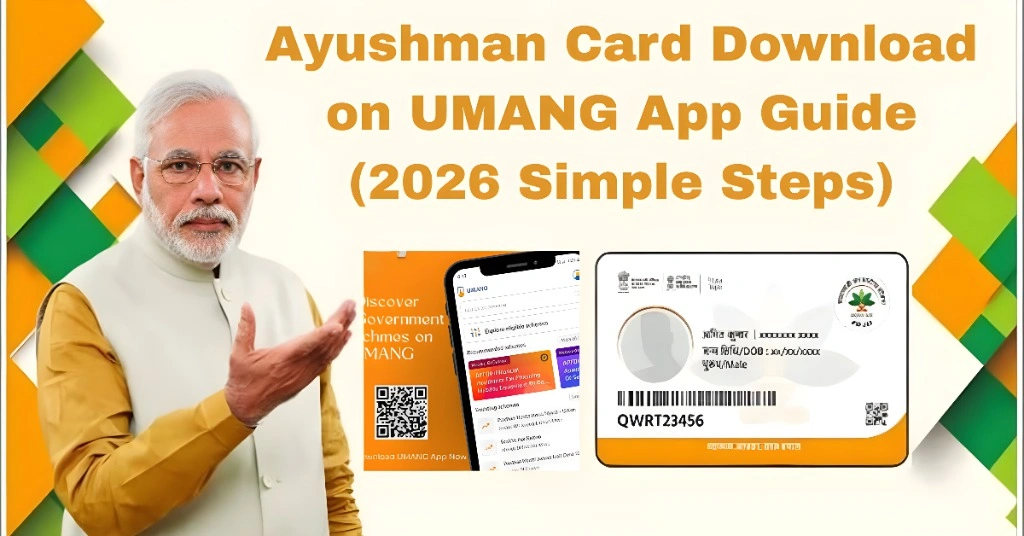
Ayushman Card Download on UMANG App – Quick Summary Table
| Step | Action | Details | Purpose |
|---|---|---|---|
| Step 1 | Open UMANG App | Install and open the UMANG app on mobile | Start the process |
| Step 2 | Login Account | Enter mobile number and verify OTP | Secure access to app |
| Step 3 | Search PMJAY Service | Type “Ayushman Bharat” or “PMJAY” | Find health scheme section |
| Step 4 | Select Service | Choose beneficiary or Ayushman service option | Access card tools |
| Step 5 | Enter Aadhaar | Provide Aadhaar number for verification | Confirm identity |
| Step 6 | Check Status | System verifies eligibility and details | Confirm approval |
| Step 7 | Download Card | Click download option and save PDF | Get Ayushman card |
Step by Step Ayushman Card Download on UMANG App
Download and open the UMANG app on your mobile phone.
Sign in using:
- Mobile number
- OTP verification
In the search bar, type:
- Ayushman Bharat
- PMJAY
Choose the option related to beneficiary services.
Provide your Aadhaar number for verification.
If you are approved, your details will appear.
Click on download option and save PDF to your phone.
Common Problems in UMANG App
This happens when:
- App is not updated
- PMJAY service not loaded properly
- Wrong mobile number
- Network issue
- Server delay
- Card not generated yet
- e-KYC incomplete
- Cache issue
- Old app version
- Low storage on phone
You Can Also Read: How to Download Ayushman Card via DigiLocker ( Simple Guide)
Easy Fixes You Can Try
UMANG vs PMJAY Portal
| Method | Ease of Use | Speed | Reliability |
| UMANG App | Easy | Medium | Medium |
| PMJAY Portal | Easy | Fast | High |
| CSC Center | Very Easy | Fast | Very High |
Tips for Smooth Download
FAQs
Conclusion
Downloading Ayushman card on the UMANG app is simple when your details are correct and your account is fully verified. Most issues happen due to app errors or system delays.
If the app does not show your card, do not worry. Try again after some time or use the PMJAY portal. If still not fixed, CSC center is the fastest solution.
If it does not work, wait a little and try again. If the issue continues, CSC center can help you fix it quickly.