Ayushman Card Download on Mobile App Guide 2026 Simple Steps
If you want to download your Ayushman card on your mobile phone, it is now very easy in 2026. You do not need a computer or long process. You can do everything directly from your phone using the official app.
In this guide, I will explain step by step how to download your Ayushman card on mobile, what problems you may face, and how to fix them in simple words.
What Is Ayushman Card Mobile App?
The Ayushman card mobile app helps you:
Check your eligibility
View your approved status
Download your Ayushman card PDF
Access family member details
It is designed to make the process fast and simple without visiting any office.
You Can Also Read: Download Ayushman Card Without OTP in 2026 (Easy Guide)
Requirements Before Downloading Card
Before you start, make sure you have:
If any of these are missing, the download may not work.
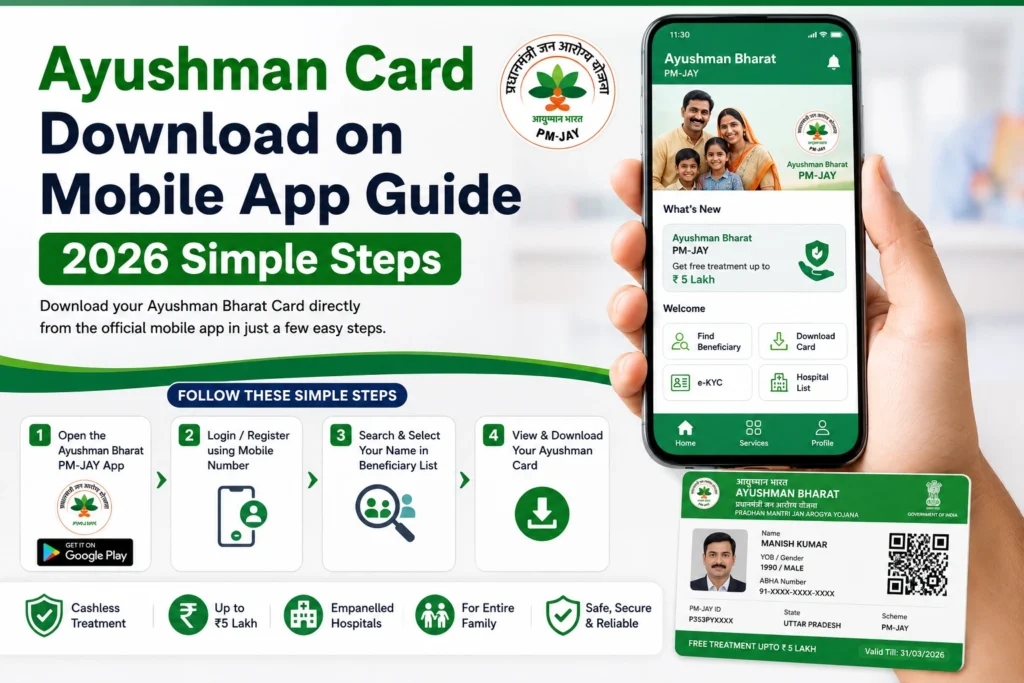
Step by Step Ayushman Card Download on Mobile
Install or open the official PMJAY mobile app or use the mobile browser.
Enter your registered mobile number and verify with OTP.
Sometimes the system itself is slow or under maintenance.
If your card is approved, it will appear in the dashboard.
Once available:
- Tap on download option
- Save PDF on your phone
- You can also print it later
Ayushman Card Download on Mobile App
| Step No. | Process Step | Description |
|---|---|---|
| 1 | Install App | Download Ayushman App / UMANG App from Play Store |
| 2 | Login | Open app and login using mobile number + OTP |
| 3 | Select Option | Tap on “Beneficiary” or “Ayushman Card” section |
| 4 | Search Details | Enter Aadhaar / Family ID / PMJAY ID |
| 5 | e-KYC Verification | Complete Aadhaar OTP or biometric verification if required |
| 6 | Check Eligibility | System shows whether your card is ready or not |
| 7 | Download Card | Click Download Ayushman Card (PDF) |
| 8 | Save/Print | Save in mobile or take print for hospital use |
Common Problems While Downloading on Mobile
This happens due to:
- Wrong mobile number
- Network issue
- Server delay
It means:
- Card is still generating
- System is not updated yet
Sometimes:
- App crashes
- Page loads slowly
- Cache issue occurs
This means:
- e-KYC is incomplete
- Card is not ready yet
Simple Fixes for Mobile Download Issues
Try these easy solutions:
Mobile App vs CSC Center
| Method | Speed | Ease | Reliability |
| Mobile App | Fast | Easy | Medium |
| Website | Medium | Easy | Medium |
| CSC Center | Fast | Very Easy | High |
If mobile app does not work, CSC center is the best backup option.
Tips for Smooth Download
Always use updated app version
Keep Aadhaar-linked number active
Avoid repeated login attempts
Use strong internet connection
Try during low traffic hours
FAQs
Conclusion
Downloading Ayushman card on mobile is simple and fast when everything is properly linked. Most issues happen due to OTP, e-KYC, or system delay, not actual rejection.
If the app is not working, just wait a little or try again after clearing cache. If nothing works, CSC center can solve the issue quickly and help you get your card without stress.