How to Re-Download Lost Ayushman Card (Step-by-Step Guide)
The Ayushman Card is part of the Ayushman Bharat Pradhan Mantri Jan Arogya Yojana (PM-JAY). It gives eligible families free medical treatment up to ₹5 lakh per year in empanelled hospitals.
If your card is lost, don’t worry — your data is still saved in the system.
Can You Re-Download a Lost Ayushman Card?
You can re-download it anytime because your Ayushman Card is stored digitally in the government database. You just need:
No need to re-apply or visit CSC unless there is a technical issue.
How to Re-Download Lost Ayushman Card Online
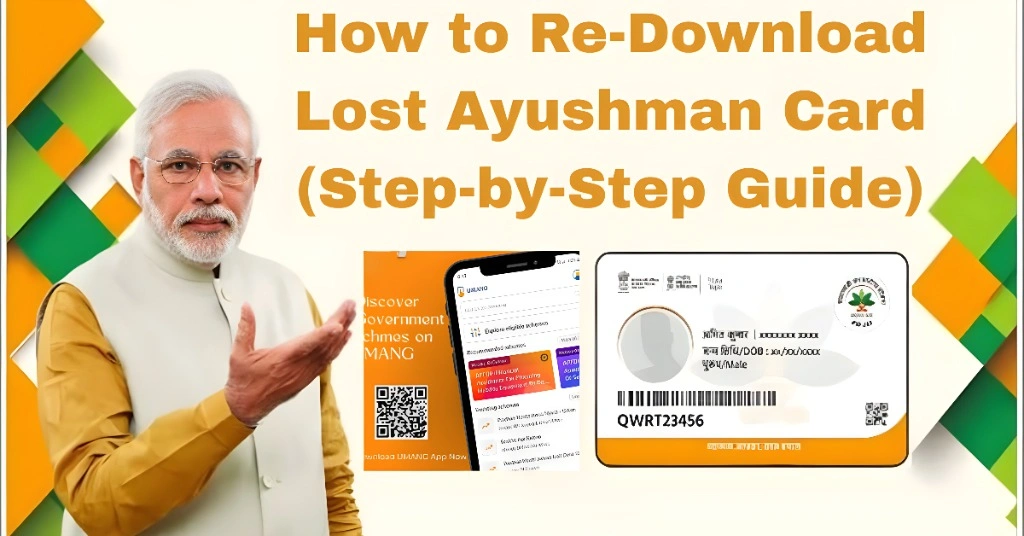
Follow these simple steps:
Go to the official PM-JAY portal or Ayushman app
Click on “Beneficiary Login”
Enter your mobile number
Verify OTP
Search your name in the beneficiary list
Click on “Download Card”
Save the PDF on your phone
Done Your card is back.
Re-Download Ayushman Card via Mobile App
You can also use the official app:
This method is faster for mobile users.
Requirements to Re-Download Ayushman Card
| Requirement | Details | Needed For |
|---|---|---|
| Mobile Number | Registered with PM-JAY | Login & OTP |
| Aadhaar Card | Identity verification | Search & matching |
| Internet Connection | Stable network | Portal access |
| Beneficiary ID | Optional | Direct search |
Common Problems & Fixes
| Problem | Reason | Solution |
|---|---|---|
| OTP not received | Network issue | Retry or change SIM slot |
| Name not found | Not verified yet | Wait for approval |
| Download option missing | System delay | Wait 24–48 hours |
| App not working | Cache issue | Clear app data |
What to Do If You Cannot Re-Download Card
If the online method is not working:
Visit nearest CSC center
Provide Aadhaar details
Ask for re-print of Ayushman Card
They will download and print it for you
This usually takes 5–10 minutes.
How to Download Ayushman Card Without Mobile Number
Sometimes users lose their registered mobile number or don’t have access to it. In that case, you can still re-download your Ayushman Card using other details.
You can try this method:
If this method doesn’t work online, the CSC center can help you retrieve your card quickly using Aadhaar verification.
Tips to Avoid Losing Your Ayushman Card Again
Save PDF in Google Drive or phone storage
Take print and laminate it
Keep screenshot in WhatsApp
Link it with DigiLocker for backup
You Can Also Read: Ayushman Card Download After eKYC Approval ( Step-by-Step )
Benefits of Having Ayushman Card Again
Once you re-download it, you can again use:
FAQs
Conclusion
Re-downloading a lost Ayushman Card is very simple. You don’t need to panic or re-apply. Just log in with your mobile number or Aadhaar and download it again in minutes.
Always keep a backup copy so you don’t lose access in emergencies.
The Ayushman Bharat Pradhan Mantri Jan Arogya Yojana (PM-JAY) ensures that your health benefits are always available — even if your card is lost.